Bring your own mailboxes · Nothing sends unchecked
Cold email that gets replies, and keeps your domains safe.
SendPath checks every list, mailbox and email before anything sends, and brings every reply into one inbox. You spend your time on conversations, not on bounces and burned domains.
14-day free trial · Unlimited mailboxes and seats · Cancel any time
Works with the mailboxes you already have
 Google Workspace
 Gmail
Gmail Outlook
- Any SMTP / IMAP mailbox
Why replies dry up
Most cold email fails before anyone reads it
Three things quietly kill replies. SendPath stops each one before it costs you.
Lists bounce
Old lists are full of dead addresses, and every bounce tells inbox providers you might be a spammer.
Lists are checked before you mail them, invalid addresses are never sent to, and a mailbox stops sending when bounces pass 5%.
Mailboxes burn out
Too much mail from a new or misconfigured mailbox lands in spam, and then stays there.
Daily caps, sending hours, SPF checks and opt-in warm-up keep each mailbox inside safe limits.
Replies get lost
Answers scatter across a dozen inboxes, and the interested ones go cold before anyone sees them.
Every reply lands in one inbox, labelled by AI, with a draft answer ready when you want one.
Features
Everything between your list and a reply
One place to check, send and answer, built so that a mistake never reaches a prospect.
Pre-send checks
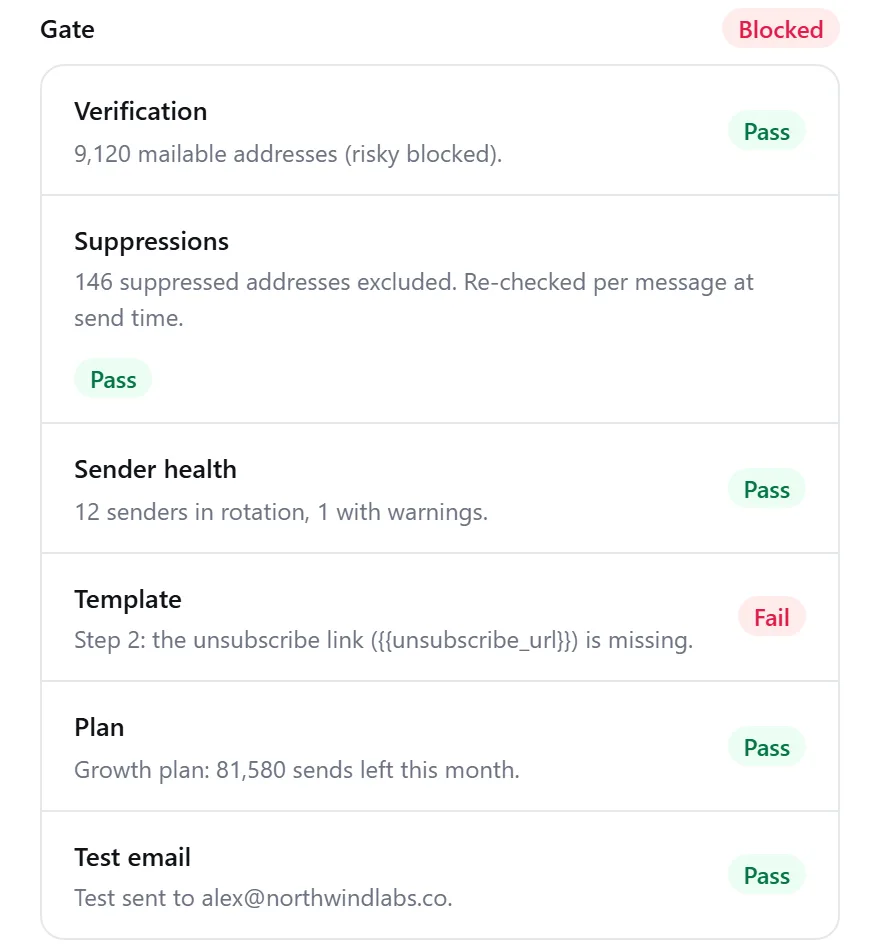
Every send is checked first
Before a campaign starts, and again before each message, SendPath checks the list, your suppressions, sender health and the email itself. If one fails, nothing goes out until it's fixed, and you see exactly why.
- Only addresses that pass verification are mailed
- Unsubscribes and bounces are never mailed again
- Every email needs an unsubscribe link and your postal address
Mailbox health
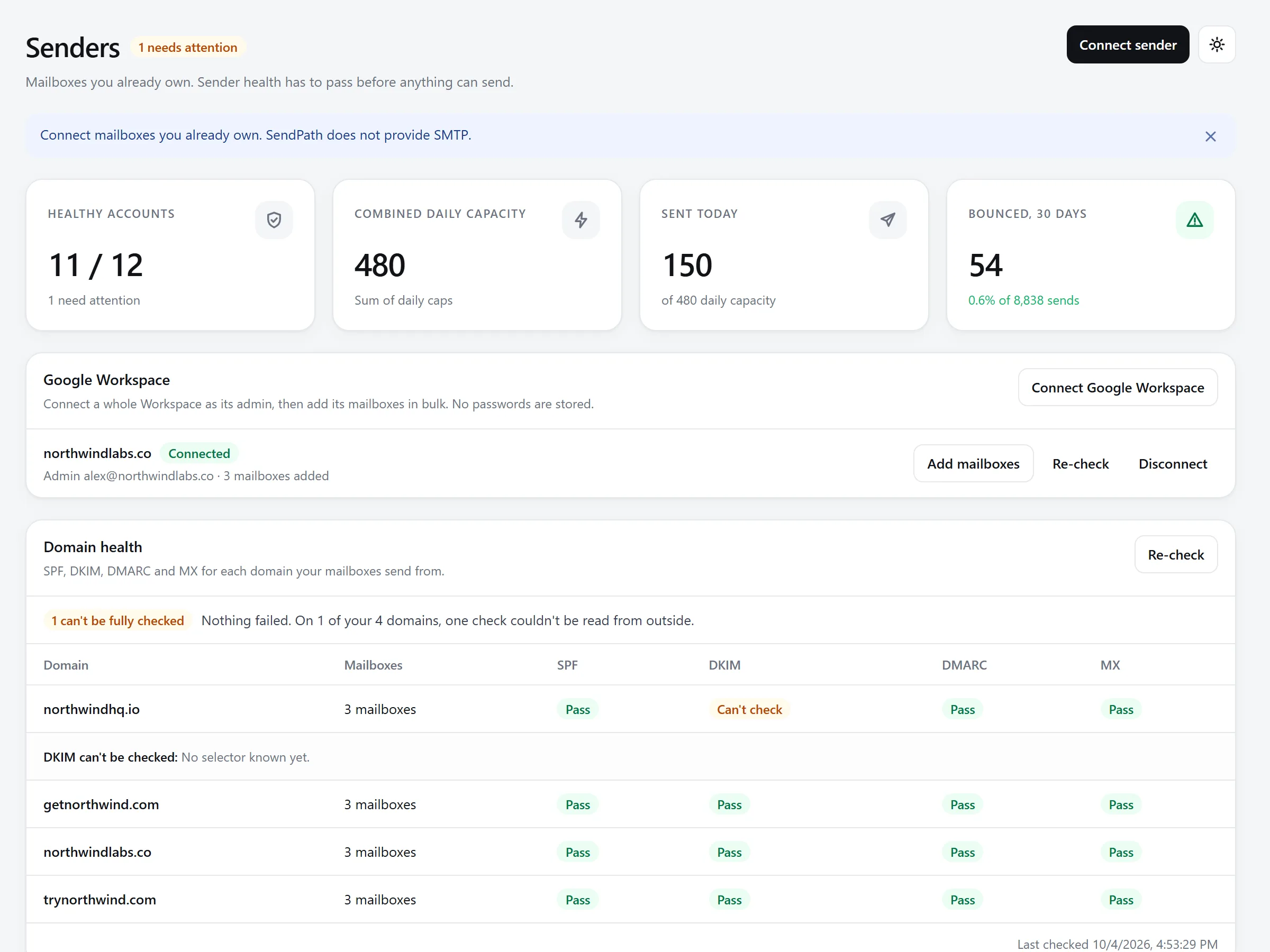
Mailboxes that stay healthy
Connect as many mailboxes as you like. SendPath spreads the sending across them, inside each one's daily cap and sending hours, checks SPF, DKIM, DMARC and MX for every domain, and stops a mailbox before bounces damage it.
- Rotation across all your mailboxes
- Opt-in warm-up with SendPath's own seed mailboxes
- Sending stops automatically when bounces pass 5%
Writing
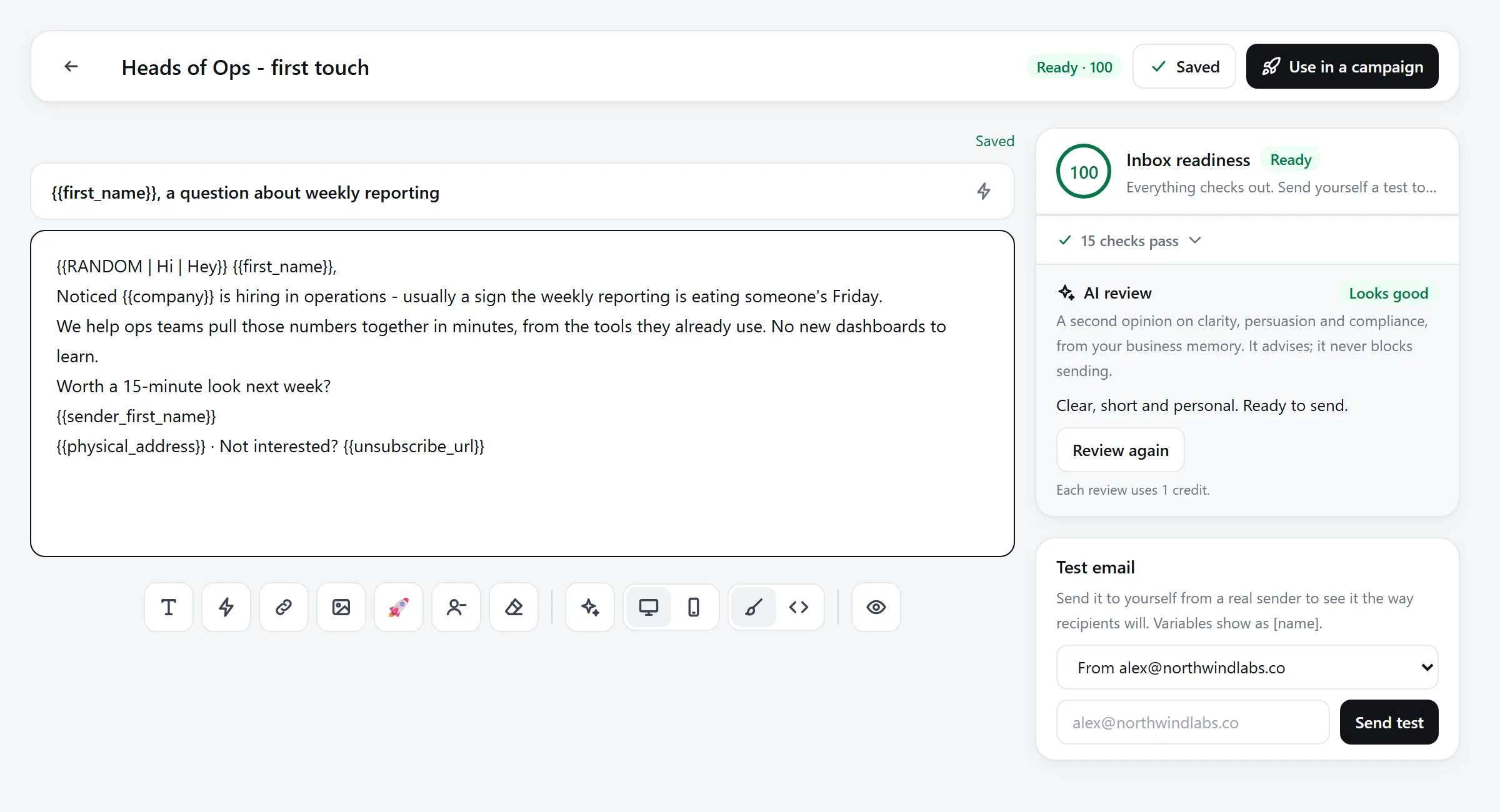
Emails written to get answered
The editor scores every email for inbox readiness as you write: subject length, spam words, variety and the rules every email must follow. SendPath AI reviews clarity and tone and can rewrite a line for you. It advises; it never sends.
- An inbox-readiness score on every email
- A/B variants and follow-up steps
- AI review and rewrites, paid with AI credits
Replies
Every reply in one place
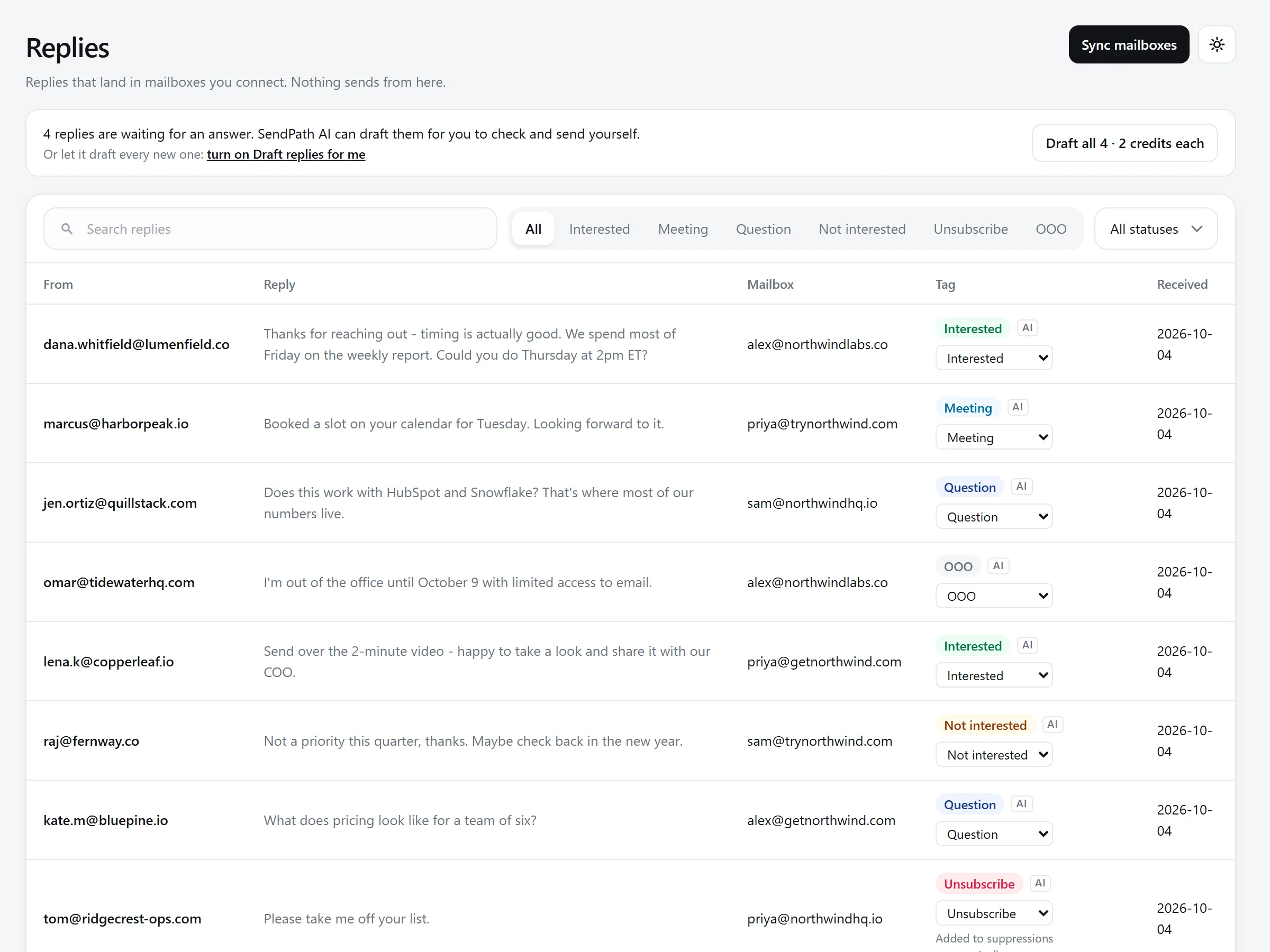
Replies from all your mailboxes land in one inbox. AI labels each one, unsubscribe requests are honoured automatically, and SendPath AI can draft an answer for you to check and send yourself.
- Interested, meeting, question, out of office: labelled for you
- Unsubscribe requests suppressed automatically
- Draft replies, never sent without you
Results
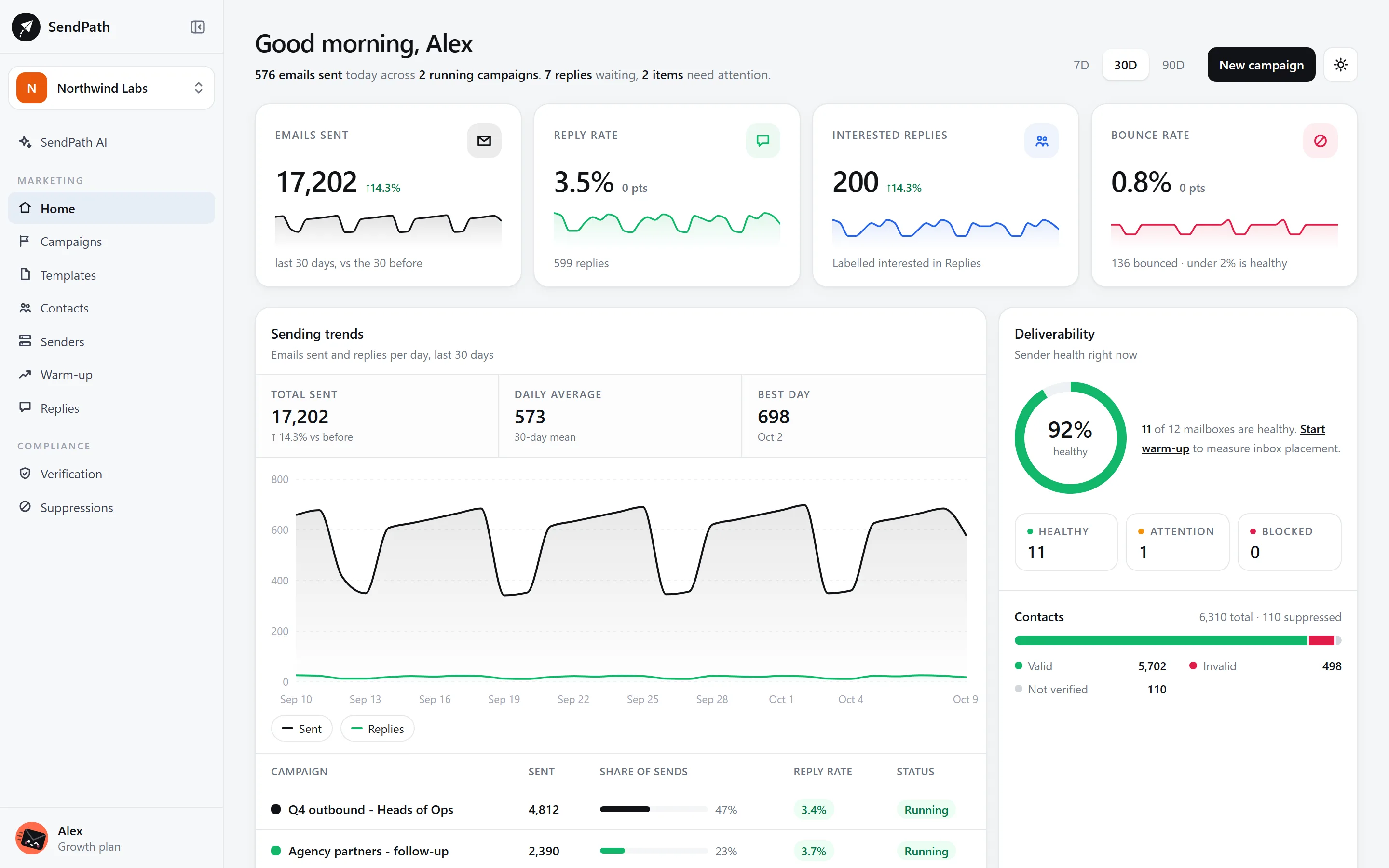
Know what's working
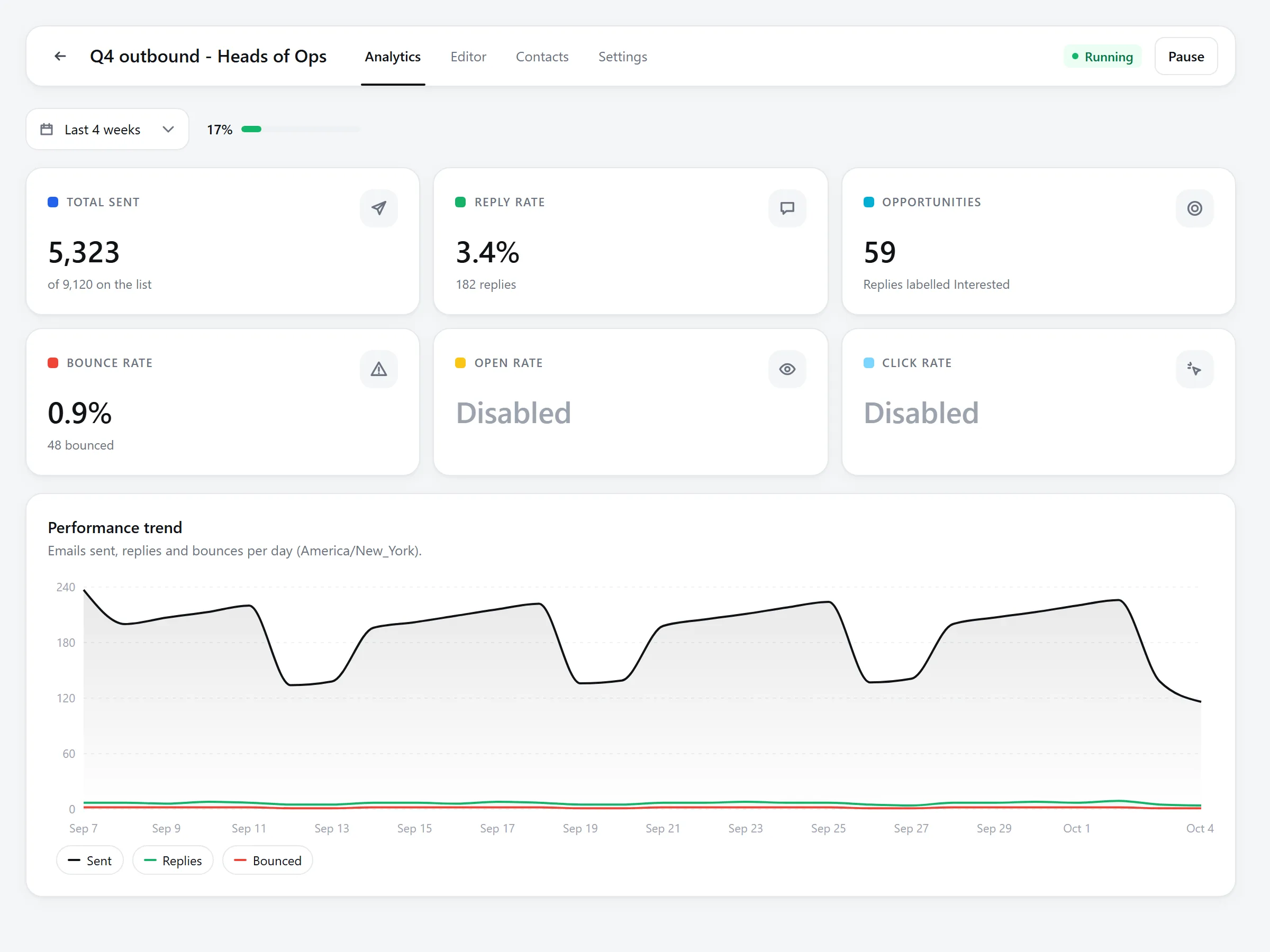
Each campaign shows emails sent, reply rate, opportunities and bounces, day by day. A/B tests pick the winning email for you, by replies or the measure you choose, so every send learns from the last.
- Reply rate and opportunities per campaign
- A/B winners picked automatically
- Bounces tracked per mailbox and per campaign
How it works
From a list to replies in five steps
Each step feeds a check, so a campaign only starts when everything is ready.
- 1
Connect your mailboxes
Google Workspace, Gmail, Outlook or any SMTP mailbox you already use.
- 2
Import a list
A CSV of contacts you already have. Duplicates and suppressed addresses are caught on the way in.
- 3
Verify
Every address is checked. The ones that fail never reach a send.
- 4
Write the emails
First touch, follow-ups and A/B variants, scored for inbox readiness as you type.
- 5
Launch
The checks run. When they pass, sending starts, spread across your mailboxes.
Built for
For anyone who lives on replies
Founders and small teams
Find your first customers without a sales team. Sensible defaults, one inbox for replies, and checks that stop expensive mistakes before they happen.
Agencies
Run outreach for many clients from many domains. Unlimited mailboxes and seats on every plan, so a new client never means a new per-seat bill.
Sales teams
Give every rep the same safe setup: shared templates, permissions for who can launch, and every reply in one place.
Why SendPath
What makes SendPath different
Other tools make it easy to send. SendPath makes it hard to send something you'll regret.
- Price
- Often charged per seat or per mailbox
- Unlimited mailboxes and seats on every plan
- Before sending
- Warnings you can click past
- Checks that hold the campaign until they pass
- Verification
- A paid add-on or a separate tool
- Included every month, more from $3.90 per 1,000
- Warm-up
- Shared pools of other users' mailboxes
- Opt-in, with SendPath's own seed mailboxes only
- AI replies
- Can answer prospects on its own
- Drafts only. Nothing sends without you
Pricing
Simple plans. Every check on every one.
Start with a 14-day free trial, no card needed. Plans differ only by volume.
Starter
For a founder or a small team sending their first campaigns.
$29/month
Billed monthly
- 5,000 emails a month
- 2,000 contacts
- 300 SendPath AI credits a month
- Unlimited mailboxes and team seats
- Verification included every month
- The full pre-send gate
- AI reply labels and auto-unsubscribe
Growth
Most popularFor teams and small agencies sending every day.
$79/month
Billed monthly
- 100,000 emails a month
- 25,000 contacts
- 1,500 SendPath AI credits a month
- Unlimited mailboxes and team seats
- Verification included every month
- The full pre-send gate
- AI reply labels and auto-unsubscribe
Scale
For agencies and high-volume outbound.
$199/month
Billed monthly
- 300,000 emails a month
- 100,000 contacts
- 5,000 SendPath AI credits a month
- Unlimited mailboxes and team seats
- Verification included every month
- The full pre-send gate
- AI reply labels and auto-unsubscribe
Prices in USD. Cancel any time; you keep the plan until the end of the period. More AI credits any time from $9 for 1,000. More verifications any time: $3.90 per 1,000, from 1,000, and they never expire.
FAQ
Questions, answered
Anything else? Write to support@sendpath.ai and a person will answer.
Will SendPath get my emails into the inbox?+
No tool can promise that, and you should be wary of any that does. What SendPath does is remove the usual reasons cold email lands in spam: unverified lists, misconfigured domains, mailboxes sending too much, and emails that look like spam. The rest is your offer and your writing.
Do you provide SMTP servers or mailboxes?+
No. You connect Google Workspace, Gmail, Outlook or other mailboxes you already operate. SendPath never sends from its own servers, and replies land in your own accounts.
Do you sell or supply contact lists?+
No. You import lists you already have and are allowed to use.
Can I switch from another tool?+
Yes. Connect the same mailboxes and import your contacts from a CSV. Paste your old unsubscribes and bounces into Suppressions, and they are never mailed again.
Can I skip a check to send faster?+
No. The checks run on our servers for every campaign and again for every message, and nothing turns them off.
What happens when a check fails?+
The campaign stays held and shows which check failed and why. If something changes mid-campaign, such as a new unsubscribe, that one message is held and the reason is recorded.
Do you offer warm-up?+
Yes, opt-in per mailbox. Your mailbox exchanges a few ordinary emails a day with SendPath's own seed mailboxes, never with other customers and never with your lists. Warm-up mail never lands in your inbox.
What are SendPath AI credits?+
Every plan includes credits for SendPath AI: questions, writing and reviewing emails, reply drafts and its other work use them, more for long documents or whole sequences and less for short questions. Reply labels and unsubscribe detection are always free, and sending never depends on credits. A report in the app shows what they were used for. Need more? Packs start at $9 for 1,000 credits.
What if I need more verifications than my plan includes?+
Buy verification credits: one checks one address, at $3.90 per 1,000 from 1,000, with no need to change plan. They're used after your plan's monthly verifications and never expire. Every address checked uses one, invalid ones included. Only addresses a check reaches use one: stop a check and the rest come back.
Who owns my data?+
You do. We don't sell personal data, and your contact lists are used only to run your workspace. You can export your contacts at any time, and delete the whole workspace from Settings.
Can I cancel any time?+
Yes. Cancel from Billing and you keep your plan until the end of the period you paid for.
Spend your time on replies, not on damage control.
Connect a mailbox, import a list, and let the checks catch the mistakes. Free for 14 days, no card needed.